Krish Shah Computer Science · Guelph
Portfolio — 2026 Computer Science student, University of Guelph Guelph, Ontario

Krish Shah

I build software that lets you test an idea before you commit to it.

I study Computer Science at the University of Guelph and learn most by building things end to end. My recent projects put a check between a decision and its consequences: a stormwater simulator you run before anything is dug, and a clinical assistant that can draft a note but cannot save it until a person confirms.

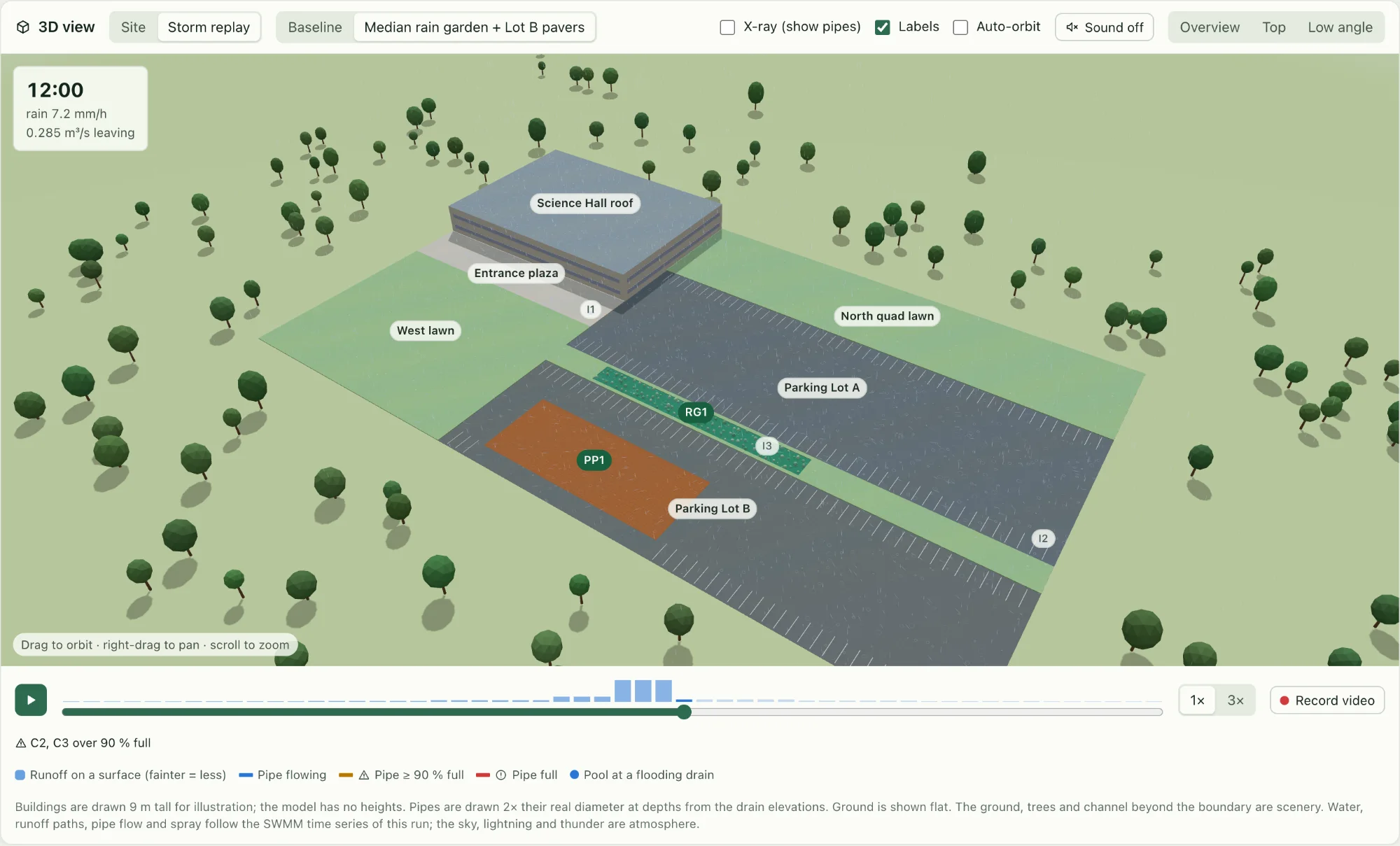
RunoffLab’s 3D view mid-storm: a campus block with a building roof, two parking lots, lawns, a rain garden strip and permeable pavers, with a storm clock reading 12:00, rain 7.2 mm/h and 0.285 m³/s leaving the site.
RunoffLab replaying a 50 mm design storm from its SWMM time series. 12:00 — 7.2 mm/h of rain, 0.285 m³/s leaving the site.

§ 01 Selected work

Projects, with the reasoning left in.

01 / 03FeaturedStormwater engineering2026

RunoffLab

A stormwater design tool that puts EPA SWMM behind an interactive site plan. Draw rain gardens, permeable pavement or green roofs on a site, then see what they do to runoff, peak flow and water quality — before anything is built.
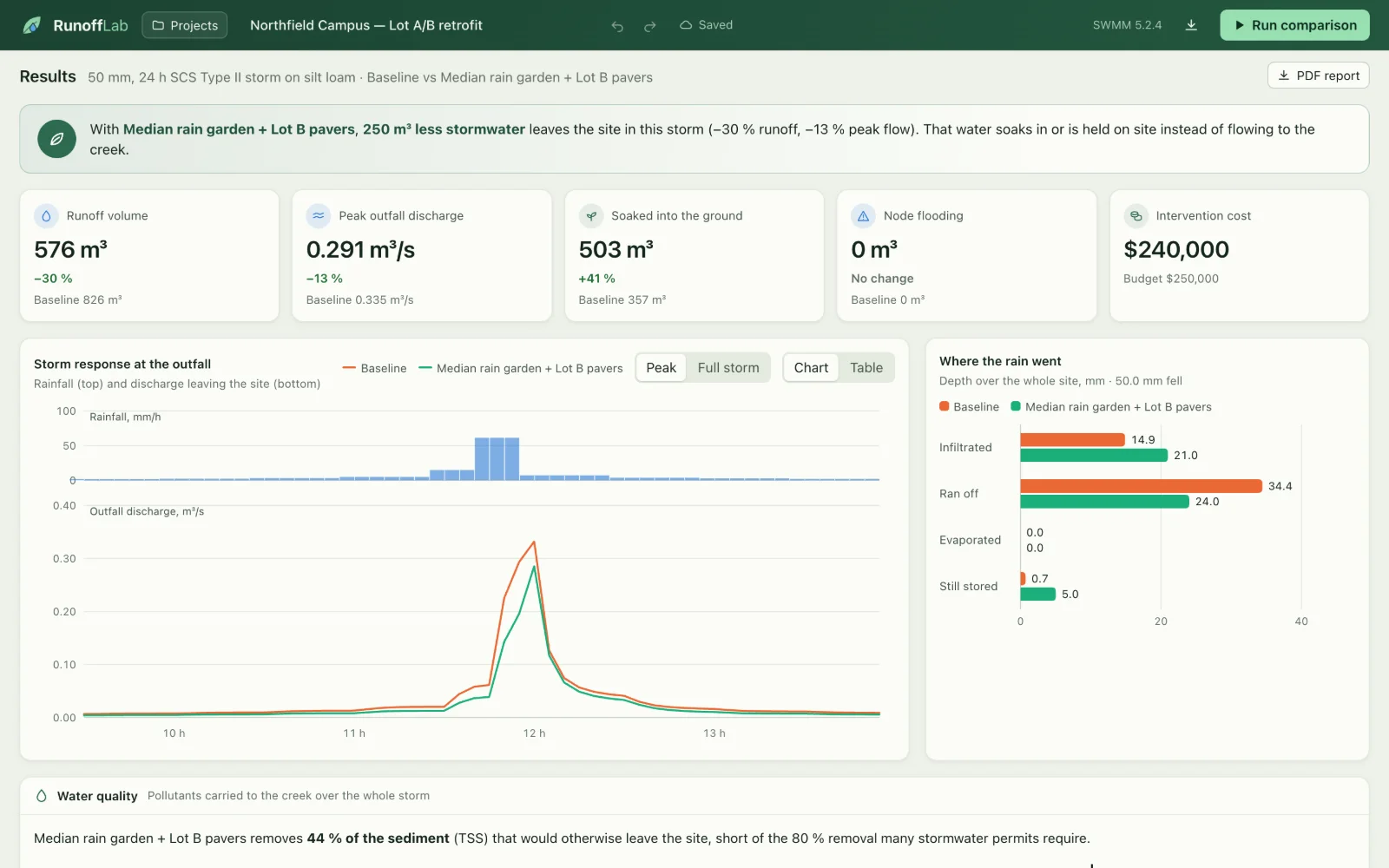
RunoffLab results: runoff 576 m³ (−30%), peak discharge 0.291 m³/s (−13%), a rainfall and outfall hydrograph comparing baseline and design, and a water-balance chart.
Fig. 02Results. Baseline against design, straight from SWMM: 250 m³ less stormwater leaves the site.
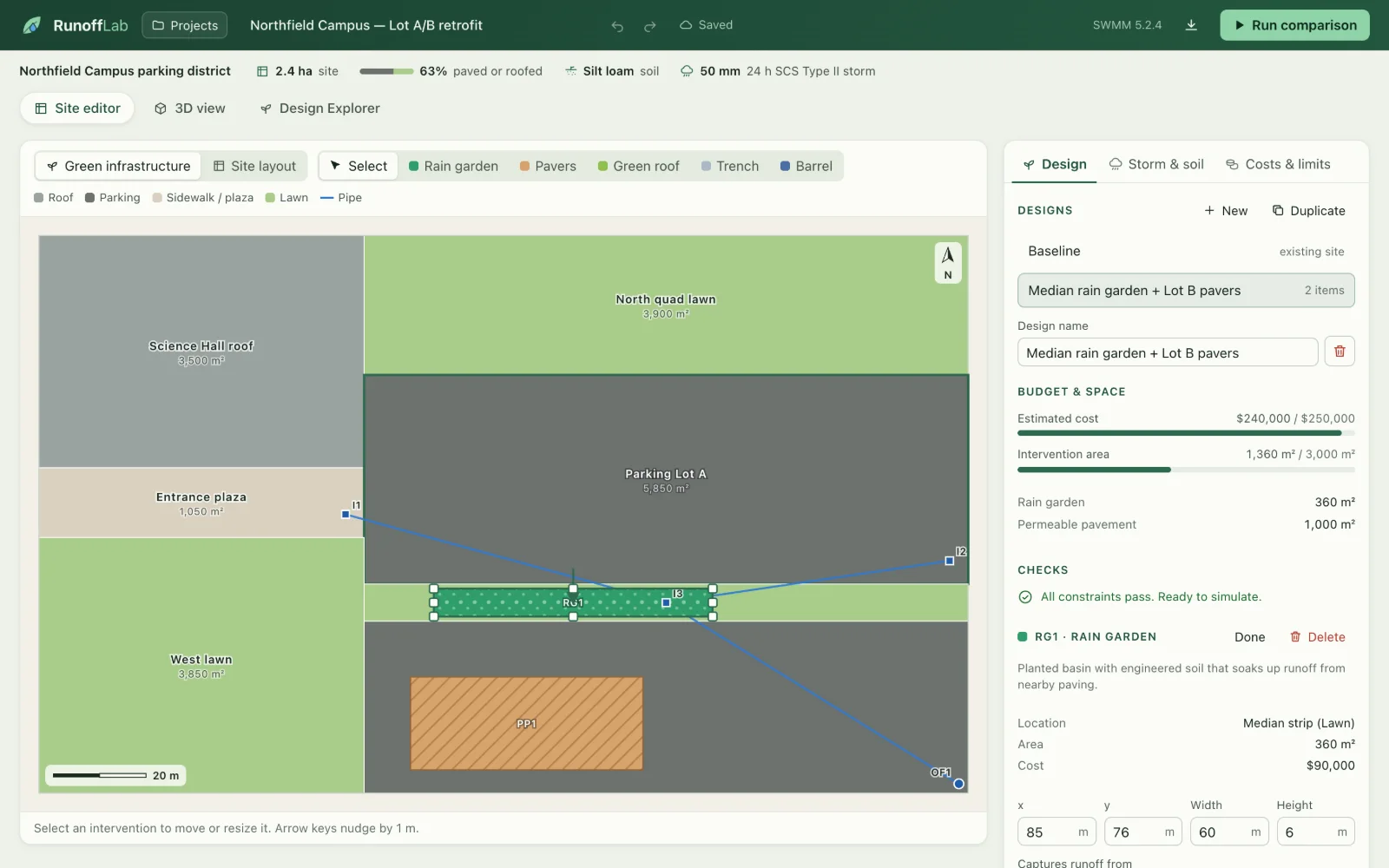
RunoffLab site editor: a plan of a campus block with a selected rain garden strip between two parking lots, and a sidebar showing budget, area and “All constraints pass”.
Fig. 03Site editor. Checks run while you draw; this design passes and is ready to simulate.
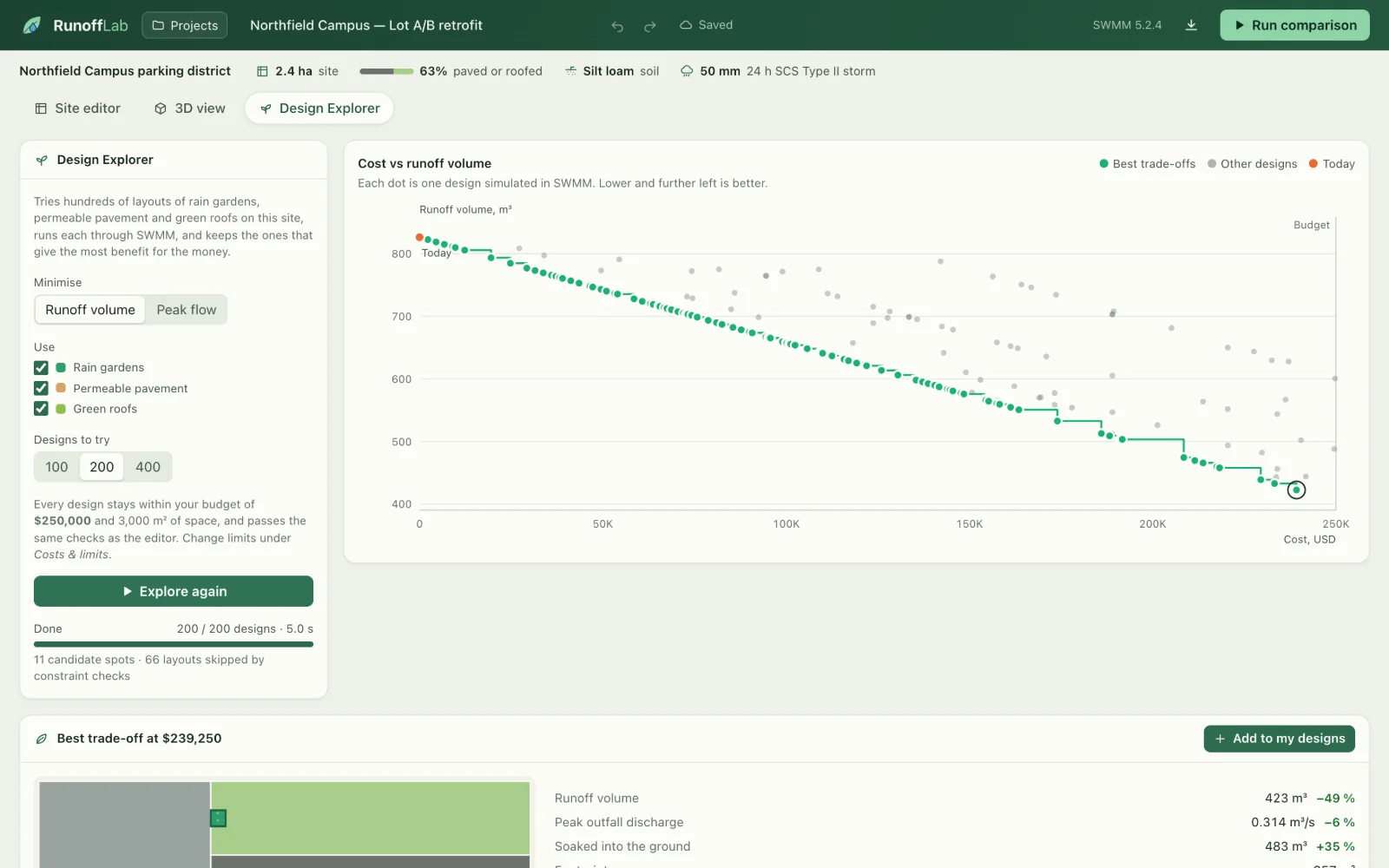
RunoffLab Design Explorer: a scatter plot of cost against runoff volume for 200 simulated designs, with the best trade-offs highlighted as a stepped green frontier.
Fig. 04Design Explorer. 200 layouts through SWMM in 5 s; the green frontier is the best runoff for each budget.
200designs
explored in about 5 seconds by the Design Explorer
−30%
runoff for the sample design in a 50 mm storm
128tests
76 pytest, 39 Vitest and 13 Playwright
0API keys
everything runs locally, including the engine

Sample numbers come from the bundled fictional 2.4 ha campus with illustrative unit costs. They show what the tool does; they are not a claim about a real site.

The problem

Paved sites send most of their rain straight into storm drains, carrying sediment into creeks and overloading pipes in heavy storms. Green infrastructure helps, but every square metre costs money, and the standard engineering model, EPA’s Storm Water Management Model, is driven by text input files and long reports. RunoffLab asks a practical question of it: which features, where, and how big, give the most benefit for the budget?

What it does

  1. 01
    Draw the site

    An SVG editor for roofs, parking, lawns, drains and pipes, plus five kinds of green infrastructure. Constraint checks run as you edit.

  2. 02
    Simulate with SWMM

    Each design becomes a SWMM 5.2 model, run locally through PySWMM: every surface a subcatchment, every feature a native LID control.

  3. 03
    Compare outcomes

    Baseline against design: runoff volume, peak outfall flow, the water balance, flooding, and sediment and phosphorus leaving the site.

  4. 04
    Search for trade-offs

    The Design Explorer runs hundreds of layouts through SWMM in parallel and highlights the cost-versus-runoff Pareto front.

  5. 05
    Look beyond one storm

    Year-long continuous runs, what-if storms and clogged soils, a 3D storm replay and PDF reports with every assumption listed.
  • Python
  • FastAPI
  • EPA SWMM 5.2 / PySWMM
  • SQLite
  • Next.js
  • React
  • TypeScript
  • three.js
  • ReportLab
  • pytest
  • Vitest
  • Playwright
  • Docker

02 / 03Hackathon · Healthcare prototype2026

MEDIQ

A hands-free clinical co-pilot prototype. Voice commands run only for a verified doctor, reports float and move under your hands, and AI-drafted visit notes can’t be saved until a clinician reviews the exact text.

2nd PlaceDigitalOcean (Hacktoberfest) × Google Developer Groups Hackathon, October 2026

Built with a team at Hack Day Guelph (Hacktoberfest × GDG on Campus).

  1. 01
    Doctor-only voice

    An on-device speaker-verification model (WeSpeaker ResNet34, ONNX in the browser) checks who is speaking before any command runs, and fails closed when nobody is enrolled.

  2. 02
    Deterministic commands

    A rule-based router handles navigation and reports — “show me the patient report”, “close the report” — so no language model decides where you go.

  3. 03
    Touchless reports

    MediaPipe hand tracking runs locally: point to aim, pinch to drag a report, pull two hands apart to resize, hold a fist to close.

  4. 04
    Drafts with a safety audit

    A structured SOAP draft and an independent audit sit side by side. Local rules always run, so the whole workflow works with no API keys.

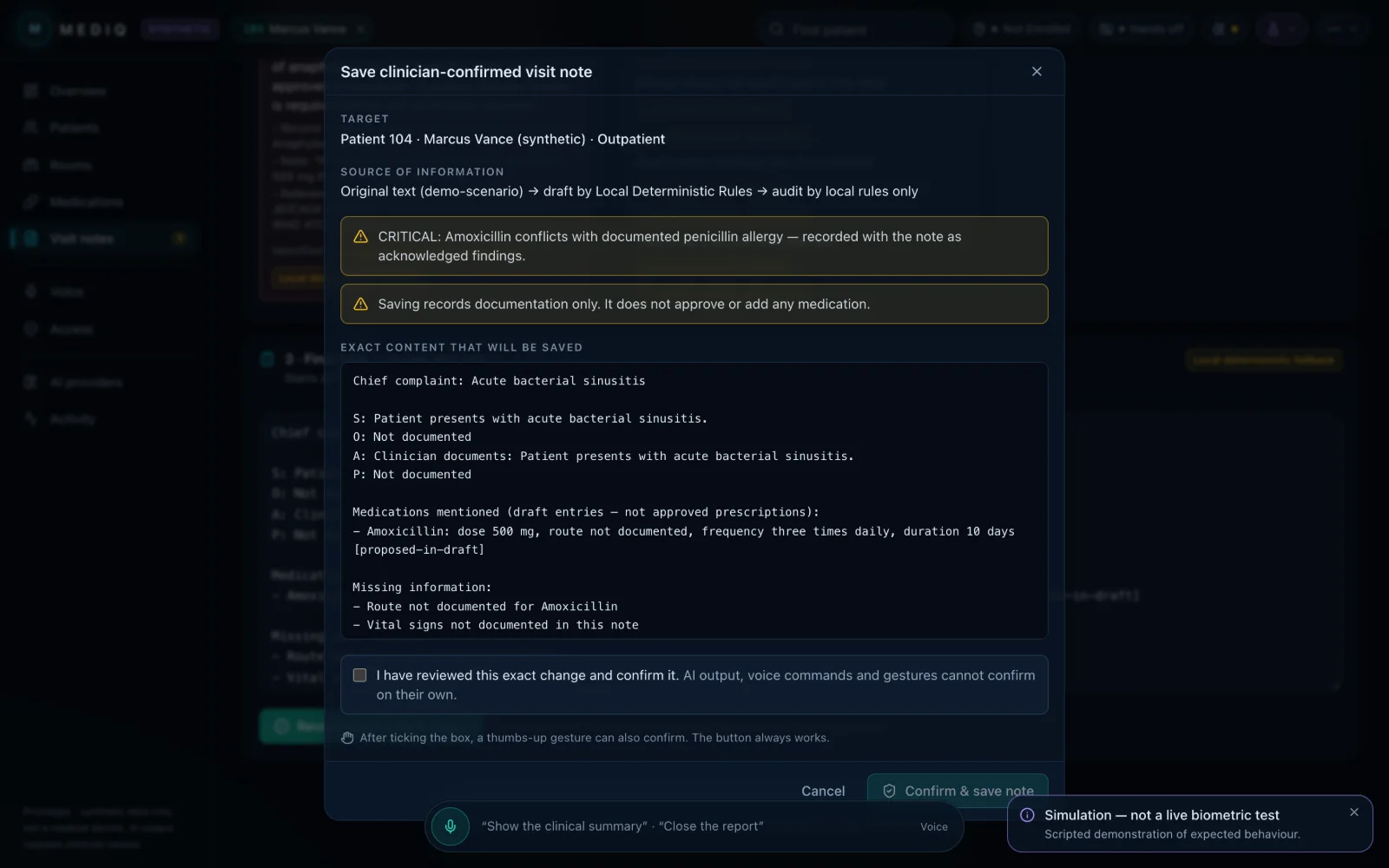
MEDIQ’s “Save clinician-confirmed visit note” dialog showing the target patient, the source chain, a critical allergy warning, the exact note text and an unticked review checkbox.
Fig. 05The confirmation gate: target, source, warnings and the exact text, behind a review tick.
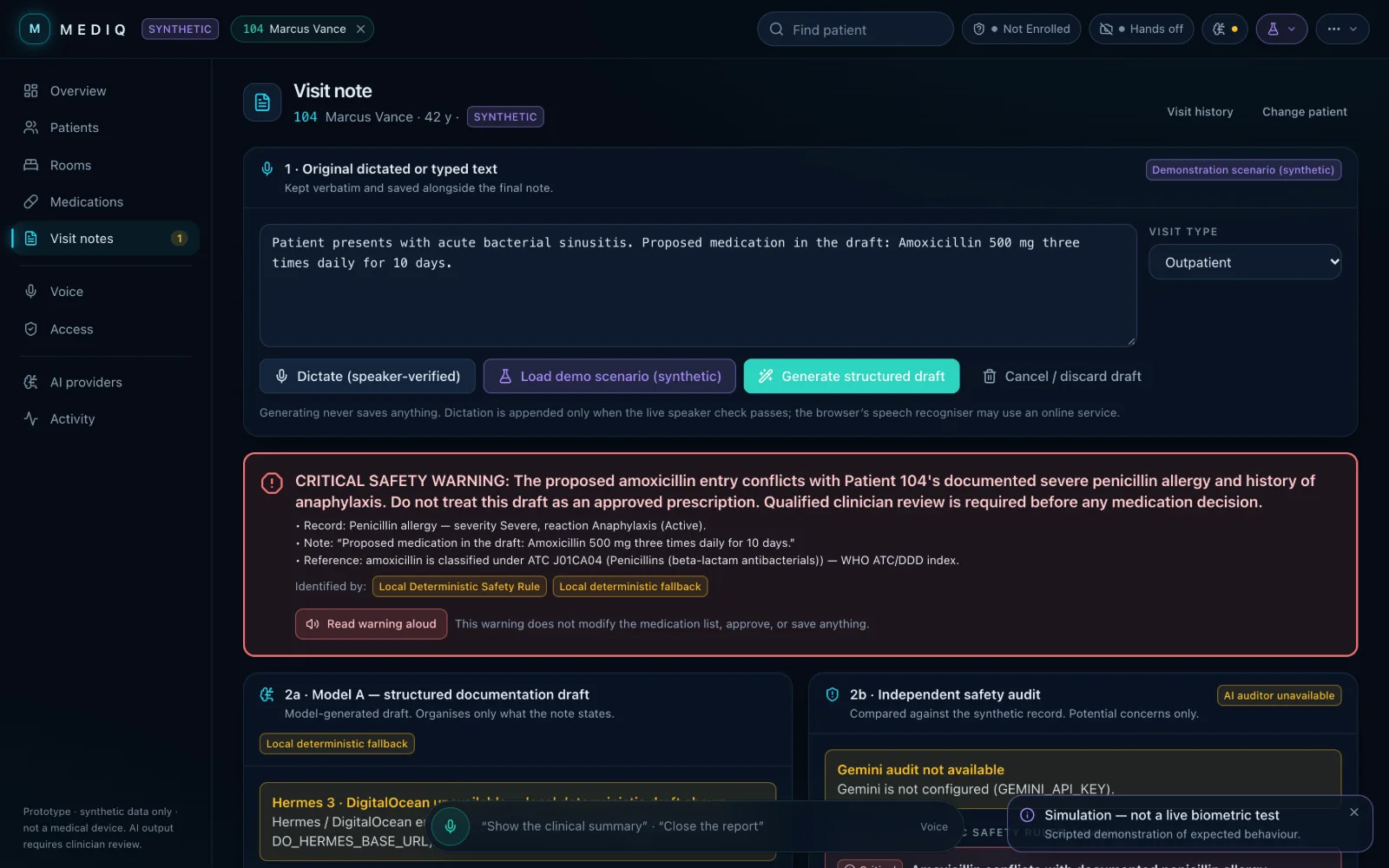
MEDIQ visit note screen with a critical safety warning: proposed amoxicillin conflicts with the synthetic patient’s documented severe penicillin allergy, identified by a local deterministic safety rule.
Fig. 06A dictated draft proposing amoxicillin trips the allergy rule. Attributed to the local rule, not to AI.
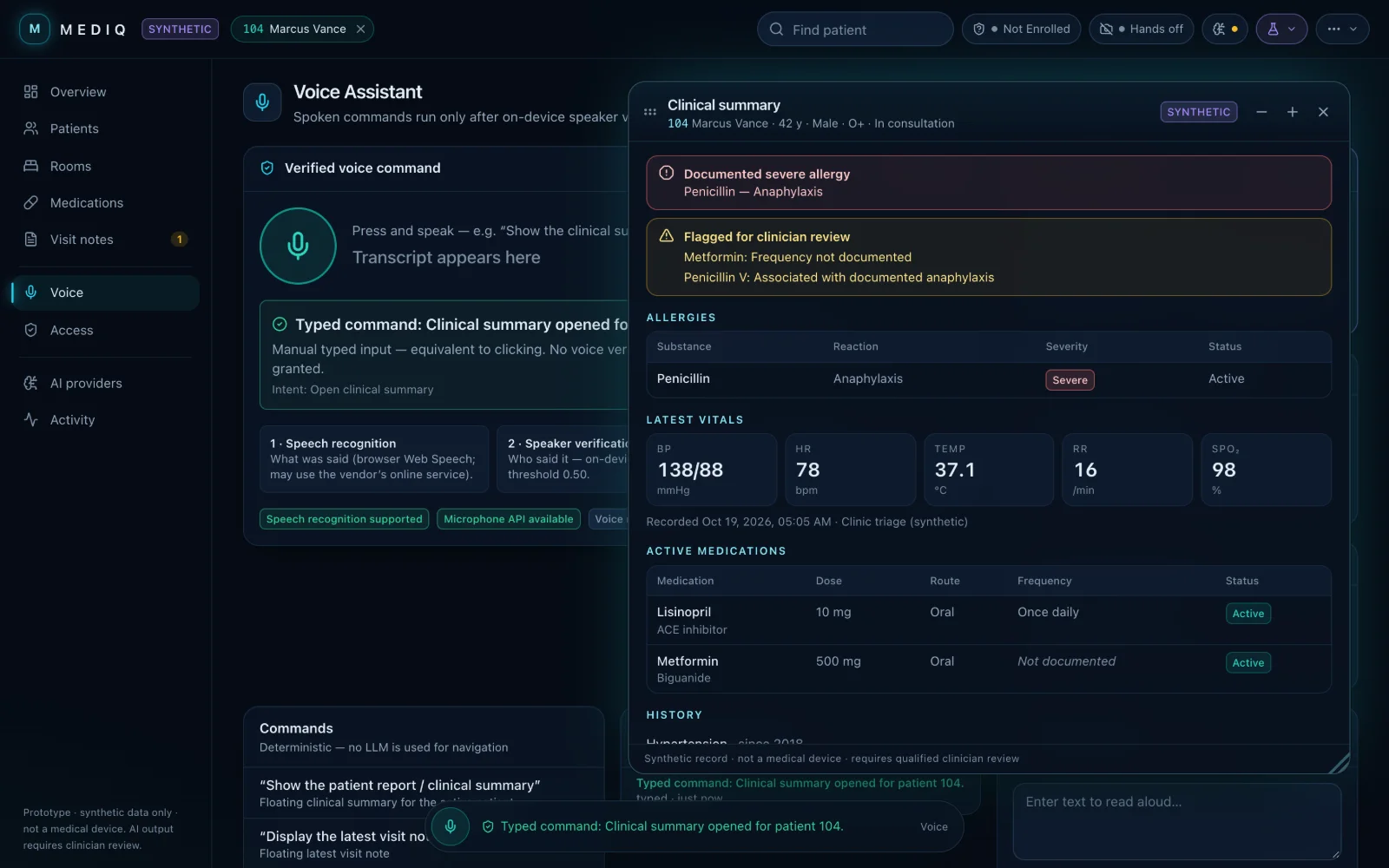
MEDIQ floating clinical summary window over the voice assistant: allergy alert, flags for review, latest vitals and active medications for a synthetic patient.
Fig. 07A floating report, opened by a typed command. The same windows can be dragged and resized by hand.

“AI output, voice commands and gestures cannot confirm on their own.”

— MEDIQ’s confirmation dialog
  1. InputVerified voicespeaker check, then rule-based router
  2. InputHand gesturesMediaPipe, on-device
  3. InputAI + local rulesSOAP draft and safety audit
  4. Can doNavigate · open reports · prepare a draftnothing is written yet
  5. Human stepClinician reviews the exact textreview tick required, Cancel always available
  6. ThenSaved to the synthetic recordwith its source and warnings
Fig. 08 — What each part of MEDIQ is allowed to do
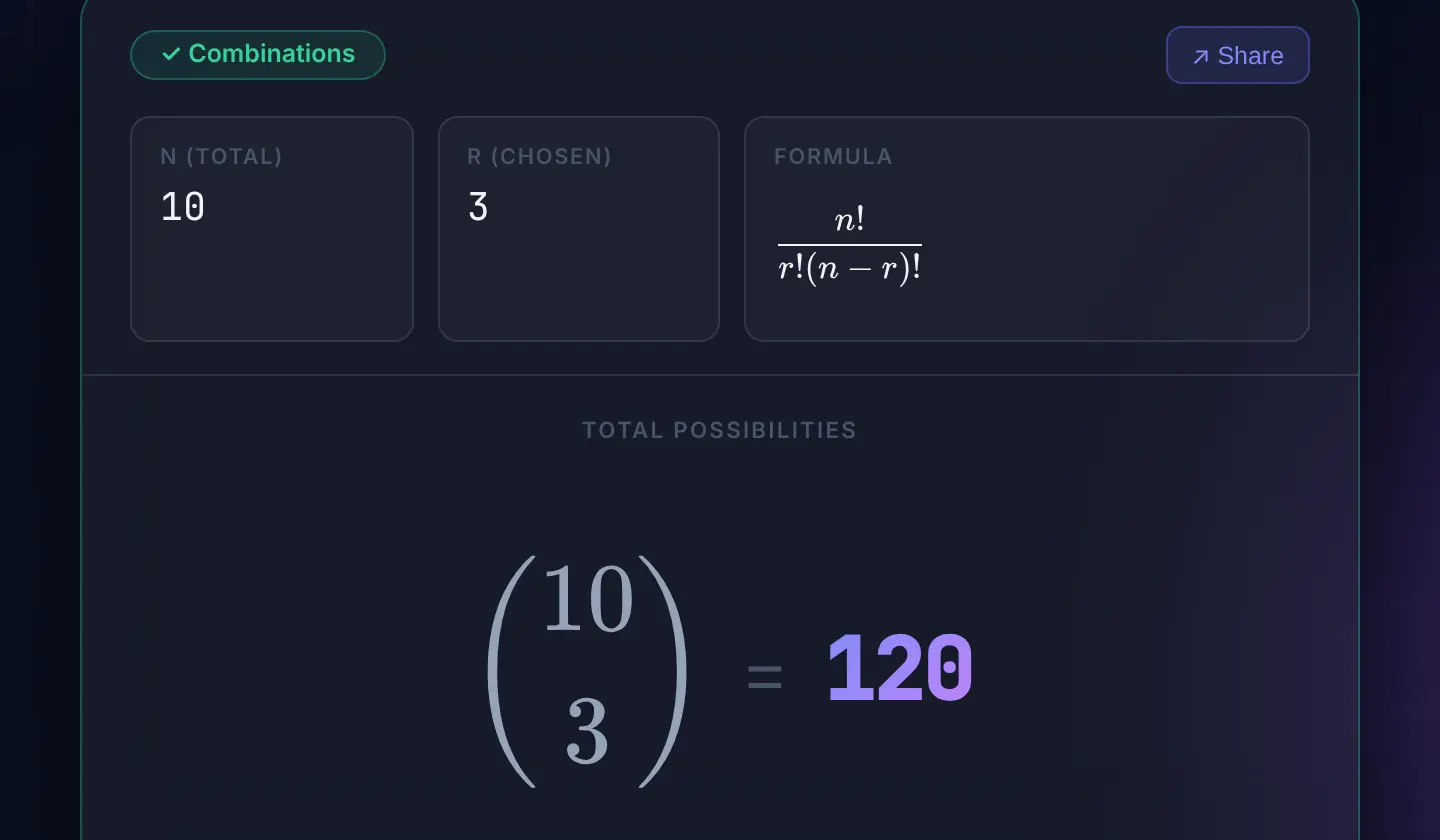
DiscreteSolver result: classified as Combinations with n = 10 and r = 3, the formula n! over r!(n − r)!, and 10 choose 3 = 120.
Fig. 09“A committee of 3 from 10 people” → Combinations → 120.

03 / 03Collaboration · Machine learning2026

DiscreteSolver

Type a combinatorics word problem; get the operation, the formula and the answer.

  1. Classify. A TF-IDF and linear support-vector classifier, trained on a labelled set of word problems, picks one of six operations.
  2. Extract. A regex parser pulls out n and r, including number words like “five”.
  3. Show the working. The result is rendered with KaTeX: operation, formula and value.
  • Python
  • Flask
  • scikit-learn
  • pytest
  • KaTeX
  • Docker

§ 02 About

I learn by building the whole thing, then finding out where it’s wrong.

I’m working toward a Bachelor of Computing in Computer Science at the University of Guelph. Coursework gave me the foundations — C, pointers and memory, data structures, discrete math — and projects are where I find out what they’re for.

The problems I keep coming back to are practical ones where a wrong answer costs something: how much water a rain garden actually keeps out of a storm drain, or what an assistant should be allowed to write into a patient record. I like software that shows its working — the assumption, the formula, the test — so someone else can check it instead of taking it on trust.

Right now I’m getting better at the unglamorous parts: reading other people’s code, debugging with GDB and Valgrind, and writing the test before I believe a number.

  1. i.

    Start from a question someone actually has.

    RunoffLab began as one: which green infrastructure, where, and how big, gives the most benefit for the budget?

  2. ii.

    Check the output against something known.

    RunoffLab’s engine tests compare SWMM against hand calculations before any result is shown.

  3. iii.

    Say plainly what it can’t do.

    MEDIQ lists its limits up front: synthetic data, no anti-spoofing, not a medical device.

§ 03 Skills

What I’ve used, and where.

01Languages

02Interfaces

03Back end & data

04Testing & tools

05Problem areas

  • Hydrologic simulation (EPA SWMM)used in RunoffLab
  • Optimisation & Pareto searchused in RunoffLab
  • On-device ML in the browserused in MEDIQ
  • Text classificationused in DiscreteSolver
  • Human-in-the-loop designused in MEDIQ

Each entry names where I used it. No ratings, no logos.

§ 04 Education & record

Where I study, and what I’ve built so far.

Expected April 2029

University of Guelph

Bachelor of Computing, Computer Science

Honours Dean’s Honour List (CCMPS)

  1. 2026 MEDIQ 2nd Place — DigitalOcean (Hacktoberfest) × Google Developer Groups Hackathon Hackathon · 2nd
  2. 2026 RunoffLab Stormwater design tool built on EPA SWMM Project
  3. 2026 DiscreteSolver Combinatorics classifier and solver Collaboration

§ 05 Contact

Hiring for a software internship, or curious about a project? Write to me.

Send a message